Applied Systems
Working software from SignaVision — built for the people who deliver access services, and the people who depend on them. Each system is evidence that SignaVision builds, deploys and operates real technology.
Booked, tracked and
billed in one place.
SignReach is SignaVision's booking platform for sign language service providers. It takes a request from the moment someone asks for an interpreter through to the invoice that closes it out, without the spreadsheets and phone calls in between.
3
Services — interpreting, CART, ASL translation
5
Booking states, from pending to invoiced
14
Interface languages, editable in the app
1
Workflow carrying all of it end to end
Built for the work
as it actually happens
Interpreting bookings rarely run in a straight line. A time gets offered and countered. A job comes in at no notice and is arranged over the phone. A rate changes in April but the invoice raised in March has to keep its old price.
SignReach models these as first-class cases rather than exceptions to be handled by hand.
Three services — one request, pricing and invoicing workflow.
Request → Invoice Pipeline
What it looks like in use
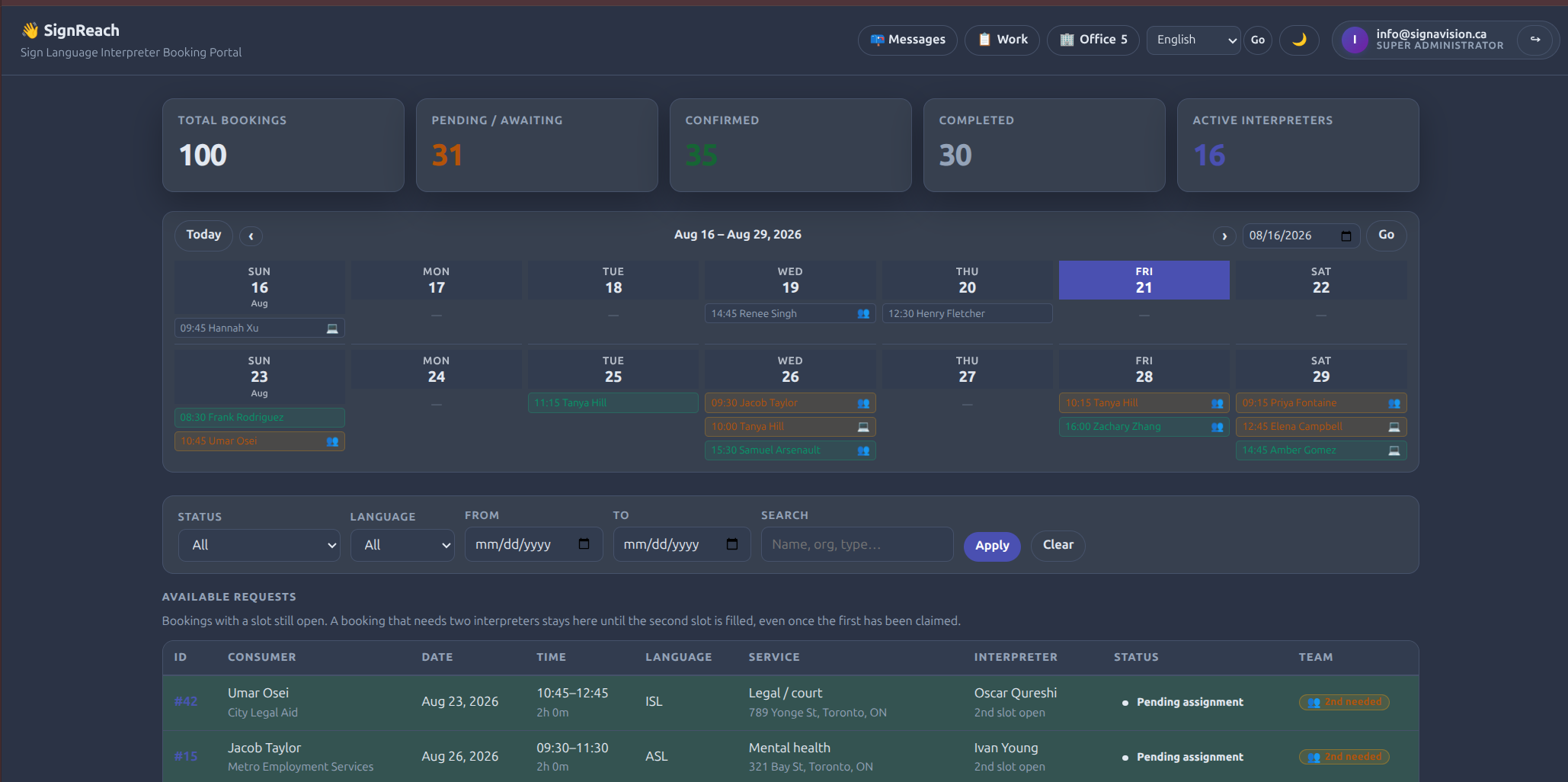
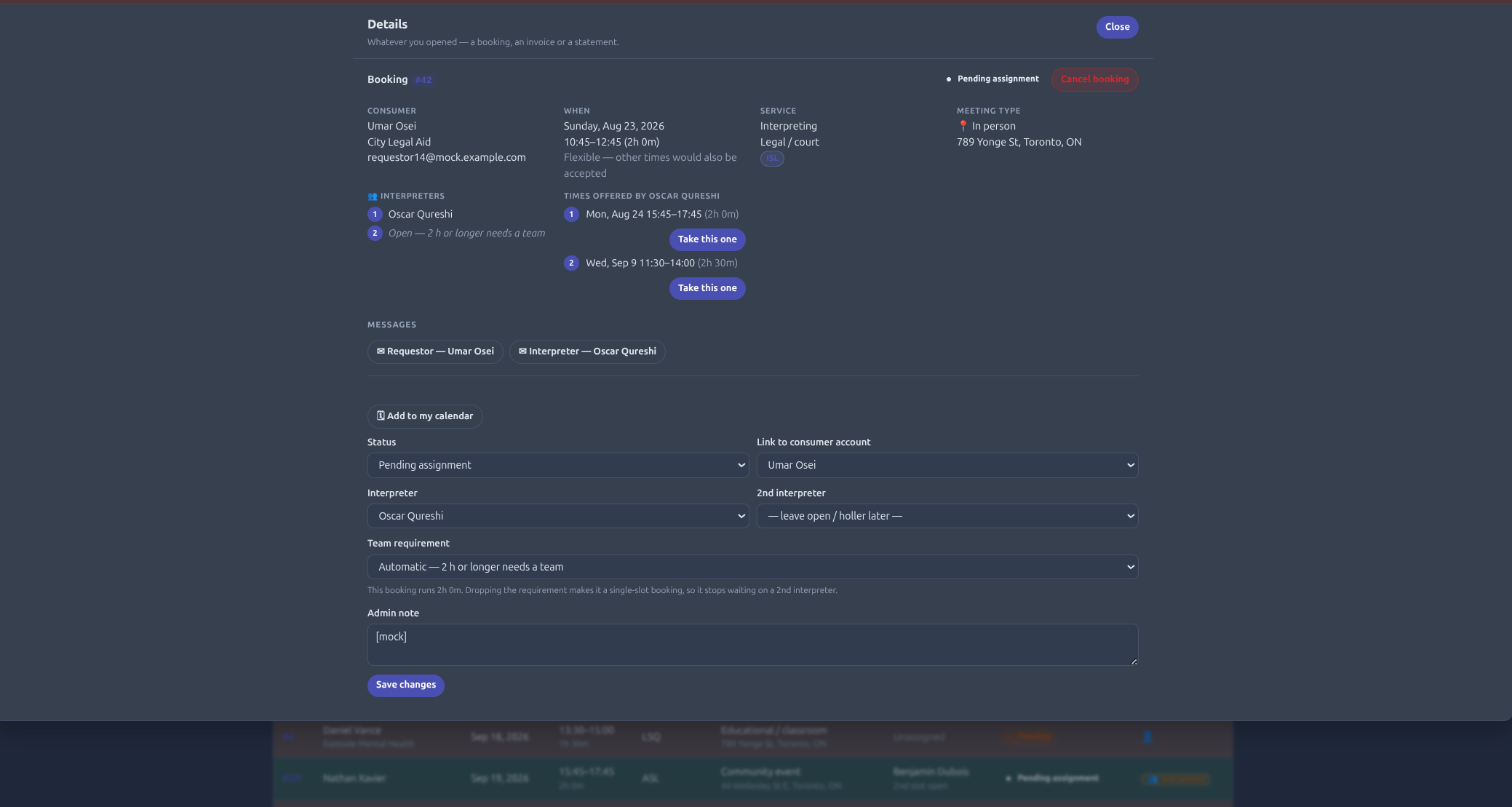
Every screen here is the running demo at signreach.signavision.ca, populated with sample agencies, interpreters and bookings.
What SignReach handles
One system for the requestor, the interpreter and the office — each seeing the part of a booking that belongs to them.
Three services, one workflow
Interpreting, CART live captioning and English-to-ASL translation. Interpreters are offered only the work they are on the roster to provide, with certifications recorded against each skill.
Bookings with a real lifecycle
Pending, pending assignment, confirmed, completed or cancelled — so everyone can see which stage a job is at instead of asking.
Proposed times, not guesswork
When a requestor is flexible, the interpreter offers specific alternative times — an hour later or a fortnight away — and the requestor picks one.
Every setting the work happens in
Medical, legal and court, educational, conference, employment and HR, mental health, community events and more — recorded on the booking so the right person is matched to it.
On site or remote
Remote bookings run on Zoom, Teams or a platform of your choosing. Connect a Zoom account once and meetings are scheduled for you, with OAuth tokens encrypted at rest.
Rate cards that respect history
Agency rates are effective-dated and invoices keep their own snapshot, so raising a rate never rewrites what an earlier booking was charged. Interpreters propose their own rate cards for the work they do.
Invoices and monthly statements
An invoice per booking stays the unit of truth. Organisations that would rather have one monthly bill get a statement that collects them, without losing the detail underneath.
Interpreter earnings
Each interpreter gets their own account of each booking, so what they are owed is derived from the work rather than reconciled after it.
Work arranged off-platform
A job phoned in or covered at no notice still has to be paid for. The interpreter records it afterwards and the office approves it — and only approval turns it into a booking anything can be invoiced from.
Availability that means something
Interpreters record when they are free to work, so offers go to people who can actually take them.
Messaging scoped to the booking
Requestors and interpreters can reach each other about the job they share — and only about that job. Who may write to whom is enforced, not left to etiquette.
Fourteen interface languages
English plus Czech, Dutch, French, German, Greek, Hungarian, Italian, Polish, Portuguese, Romanian, Spanish, Swedish and Ukrainian — editable in the app, without a redeploy.
How a booking moves through SignReach
01
The request comes in
A requestor asks for a time, names the service setting, picks interpreting, CART or translation, and says whether it is on site or remote.
02
It reaches the right interpreters
The job is offered to people recorded for that service and free at that time. They accept, or propose times that work.
03
The requestor confirms
One of the offered times is chosen and the booking is confirmed. Remote jobs get their meeting scheduled automatically.
04
The job is worked
Both sides can message each other about it up to the day, within the booking they share.
05
It is priced and invoiced
The booking is charged from the rate card in force on its own date, and the invoice keeps that snapshot for good.
06
Everyone gets their account of it
The client gets an invoice or a monthly statement; the interpreter gets their earnings for the work.
Frequently asked questions
Three: interpreting, where spoken English is rendered into ASL live; CART, which is live captioning; and translation, where prepared English material is rendered into recorded ASL. All three run through the same booking, pricing and invoicing workflow.
Yes. A booking can be on site or remote, and remote bookings can run on Zoom, Microsoft Teams or another platform. Connecting a Zoom account lets SignReach schedule the meetings itself.
Agency rate cards are effective-dated rather than edited in place, and every invoice keeps its own snapshot of what was charged. Raising a rate today does not change what a booking from last year cost.
Interpreters propose their own rate cards for the work they do, with a rate per item, which the agency reviews.
An interpreter can record it afterwards as a past work claim. It stays a claim — invisible to payables and to anything a client could be invoiced from — until the office approves it, which turns it into a booking and an invoice in one step.
The interface ships in fourteen languages, and the wording is editable inside the application rather than requiring a code change.
Try it on real bookings.
SignReach runs as a working instance at signreach.signavision.ca, loaded with sample agencies, interpreters and bookings so you can move a job from request to invoice without touching your own data.
Sign-in is issued on request rather than left open — tell us who you are and what your agency books, and we'll set you up with an account.
Request demo access